
Contract management? What does it have to do with me?
Almost every business activity is based on a "contract" of some kind. Your employees "manage contracts" all the time as part of their day-to-day work. Examples? Managing contract validity, the validity of guarantees and insurance policies, the end of warranty and service periods, periodic inspections and reports, etc…
01Using benefits we fought hard to negotiate
We worked so hard to get these benefits – and we won't use them? Benefits have an expiry date: if we don't respond in time, we lose them
02Avoiding dangerous pitfalls with rigid deadlines
Failing to handle them can cause enormous expenses and even criminal sanctions
03Using years of knowledge and experience
Every new contract you draft is built with new terms that are lessons learned from contractual events that harmed you in the past. Using this knowledge protects the business and saves it costs.
04Saving employee time
When contracts are inaccessible, employees waste effort searching for documents, re-reading legal wording, etc. Managing contracts with software makes the contracts, and a concise summary of their data, readily accessible
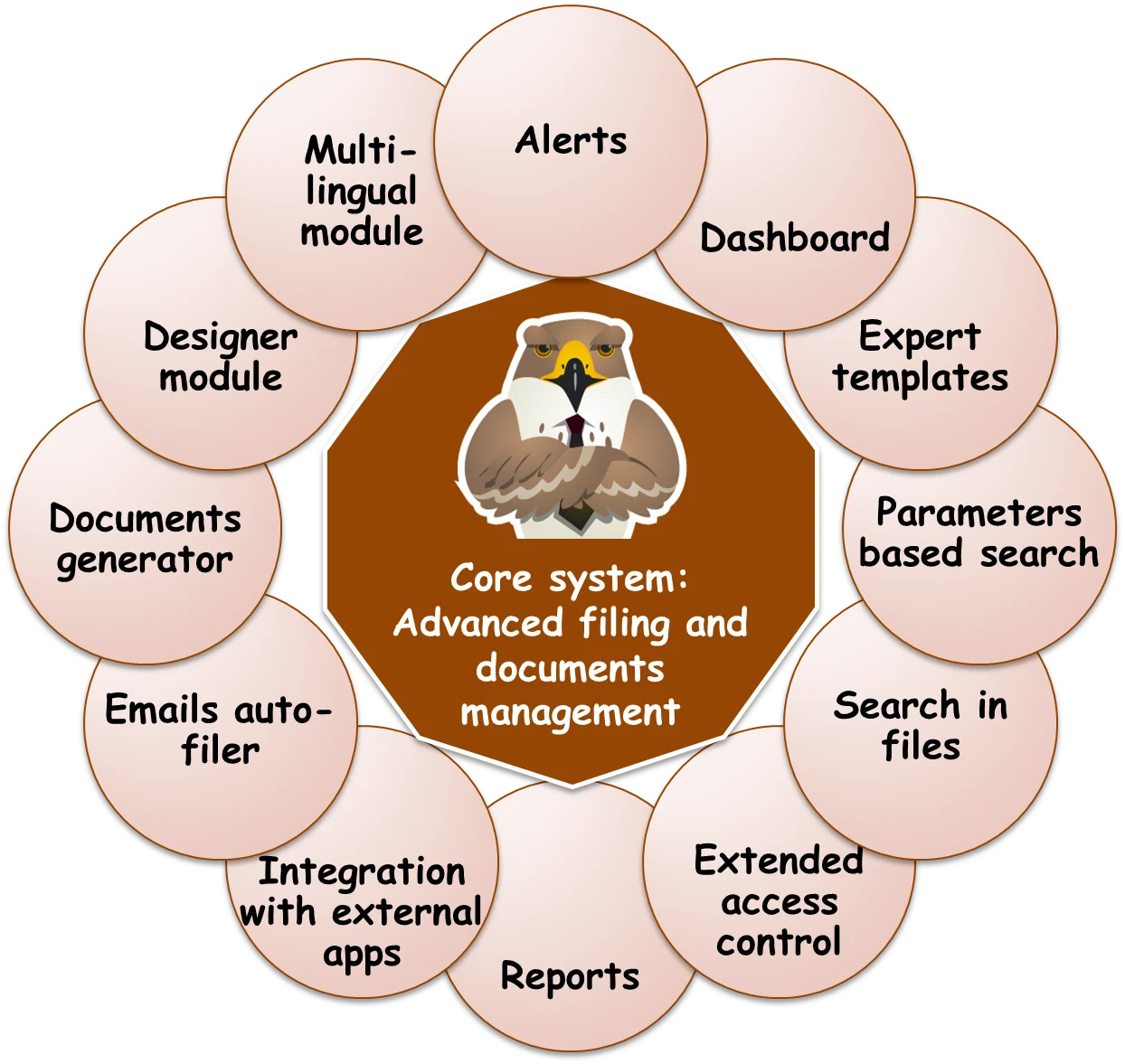
The system's components and its modules
The core of the system includes filing/tagging, document management, electronic forms for input and display, access management, and search engines for quick retrieval. Beyond the core, the system includes a large number of advanced modules.
Not just a system – an expert solution!
We provide both the system and optimal methods for managing contracts with it
Assembly will help you analyze your contracts and enter them into the system in a way that delivers maximum value to the business, with minimum operational effort
- We'll identify the contractual pitfalls you should avoid, and create alerts for them
- We'll identify benefits worth using, and create alerts for them as well
- We'll identify the topics worth summarizing, to save time finding them later on
- We'll learn how to get the most out of the email alert mechanism, to make sure what needs to happen does happen, and even to manage "mini projects" with interim reports from multiple recipients
- We'll identify data worth entering for easy retrieval of contracts in the future, for producing reports, for sharing with colleagues to save time…
- We'll set up automatic rules that save time and prevent mistakes
- We'll examine how to create even more value with advanced mechanisms such as approval workflows, Active Directory synchronization, a direct connection to Outlook, etc…
- We'll activate interfaces to other systems in your organization to enable efficient work
The system includes dozens of ready-made templates
Contract templates of various types, based on accumulated knowledge, ready for immediate use
Extended templates for a variety of common contract types: fields and tables tailored to each contract type
- The module comes with dozens of unique, extended templates for a wide range of contract types (including matching lists and catalogs), with a dedicated template tailored to each contract type
- Product purchase contracts, for example, include a "Warranty and Service" table, with warranty and service end dates, service prices and links to the products and the sites where they are installed, etc.; the same contracts also handle service calls, exceptions and penalties, service allocation and utilization, etc.
Shorter system setup and implementation
- The ready-made templates are based on experience gained setting up and managing thousands of contracts at the system's customers, and form an "expert system" for thorough, correct contract management.
- The ready-made templates save time in setting up and implementing the system, since there is no need to build templates individually for each customer
The system is built on a powerful core module shared by all installations
A digital form generator for contracts, for organized and concise display and convenient input that encourages effective management, including advanced management of related files
Quick and simple creation of a "computerized contract", with fast input and a concise display
- Entering contracts using ready-made templates, or templates built specifically for the customer
- Managing related files and documents – attach files to contracts, and access them from within the system
- Simple, fast retrieval of contracts with a Google-like search engine
- Two security circles for access management
- An advanced, modern, browser-based user interface (no installations needed)
- A cross-organizational system (all departments and employees, all engagements and contracts)
- Advanced time-saving actions – duplicating contracts, bulk updates, etc…
- Quantitative data and formulas based on a calculation engine
- Related contracts with mutual links
- Natural connectivity to other software systems in the organization (and in the cloud)
- Extensibility through a rules engine based on schedules or on actions in the system
- An interface in the language that suits you – Hebrew/English (additional languages possible)
Email alerts with execution tracking
Tracking important contractual dates ("events") with email alerts
Automatic delivery of email alerts
- For each contract you can define dates on which an "event" of a certain type occurs – contract end, guarantee expiry, expiry of an extension option, etc.
- Any number of "alerts" can be attached to each event, with different dates and different recipient lists.
- When each alert falls due, the system starts sending "alert messages" (emails) to the recipients, and keeps resending them as long as no "done" has been reported for them. The messages include a link that opens the contract directly, plus other valuable information: subject, how to handle it, handling deadline, notes…!
A screen for managing and tracking alert handling status
- The system provides advanced management and tracking of alerts and their handling: checking each recipient's handling status, cancelling all alerts for all recipients at once (or those related to the same event), postponing an alert to a future date, etc.
- The system also allows entering an interim status, which appears both on the alert management screen and in the email sent to all recipients (mini projects)
"Special" alerts
- Alerts can also be created based on conditions met in data outside the system (in other systems in the organization, or even outside it), where the date is not known in advance. This requires adaptations by the system vendor, according to the specification of the conditions and the matching alerts
Finding contracts with simple text and with advanced parameter queries
Finding contracts based on advanced queries
Parameter-based search – finding contracts by building advanced queries
- Parameter-based search allows precise retrieval of contracts based on the values stored in them.
- You can search by approximate value, exact value, values picked from a list, yes/no, number and price ranges, rolling dates (from "today" to "end of quarter", for example), etc.
- The search mechanism also allows searching by the calculated results of formula fields, and is the basis for creating indicators in the dashboard and reports in the reporting system
Saving and loading searches
- Searches can be saved, given a name and a description, and shared with colleagues. A search is run by loading the saved search, without re-entering the search criteria
Saving searches as browser bookmarks/favorites for quick reuse
- Searches can be saved as browser bookmarks (also called "favorites"). The search is run by navigating to the bookmark, without re-entering it
Producing reports to Excel
Exporting contract data to Excel files, based on editable templates from several design "families", including scheduled automatic reports
Excel-based reports
- The system lets you select contracts from search results (the report source) and create an Excel report from them by choosing a ready-made template that defines the report's structure and the data shown in it. Producing a report is simple and fast
Reports are based on templates that can be extended and adapted to customer requirements
- Reports are easily produced from Excel-based "report templates", each with a name and a description, that define their design (fonts, colors, etc.) and structure: table or pages, displayed fields, etc. Additional report templates can be set up at any time (customers can also set them up on their own)
You can also define "automatic reports" based on a saved search, a report template and a recipient list, which are sent automatically on a suitable schedule
Dashboard
Graphical display of analyzed contract data, personalized for each employee
Graphical display of data analyses and queries
- A personal dashboard lets each employee see, at a glance, a variety of analyses of contract data, from a single indicator showing the number of contracts expiring next month, to a bar chart of budget versus utilization. Clicking an indicator leads to the matching list of contracts. Indicators always show up-to-date information.
Quick-action buttons for common tasks
- The personal dashboard allows defining quick-action buttons for each employee, for common tasks in their day-to-day work – for example, creating a contract of a predefined type, or adding a report record without first opening the contract it is added to
Additional advanced modules to choose from (optional)
Approval workflow and version management module, for attached documents
Approval of documents by several people in the organization, from within the system
How it works:
- Approval requests are distributed through the system's built-in "email alerts" mechanism: all requests are consolidated into a daily email, with all the necessary information together with a link to the approval screen, repeated daily until approval is received; the approval screen lets you approve, reject, or upload a corrected document as a new version, all with comments
- There is no need to rely on email, since all alerts also appear on the alert management screen inside the system, and the approval status and approval buttons also appear in the item's view/edit screen
- The rules mechanism allows setting an order, so as not to "bother" people later in the process until those before them have approved; the mechanism's rule parameters can be updated from within the system…
Extended permissions module
Defining unlimited roles, assigning each employee to one or more roles; setting contract permissions by role rather than by name; blocking certain fields from viewing or editing by role…
Extending security to three circles (instead of two) – "role"-based permissions
- A "third security circle" is added to the system in the form of "roles": roles are mapped to contract types so that each action (read, update, delete), in each section of the contract, can be set separately. Each employee is assigned a "role", which determines what they may view/edit in the contract, and what not.
Automatic adaptation of the contract view to the role
- Although each contract is stored only once, each employee may see it differently, because the view is built dynamically according to their role in the organization. There is no need to keep the same contract in multiple copies!
Role-based contract permissions, instead of permissions based on a list of employees
- Contract permissions can be assigned based on roles, not only on a list of employees. That way, changes in the employee list are reflected automatically in the contracts, without manually updating user lists, all based on the different roles assigned to employees
An employee can have different roles in different contracts
- Each employee has a primary role that serves as the default, but can receive, ad hoc, a different role in specific contracts. For example, as "Procurement Manager" the employee may edit procurement contracts in full, but can still be assigned to the HR contracts of their own staff in an "information only" role.
Contract and document generator module
Creating documents (letters, reports, contracts, etc.) by merging contract data from the system
Generating a contract document from data entered in the system
- The module lets system users create a complete contract document as a Word file, by merging the data entered in the contract management system with a contract document template containing the full, complex legal text.
Creating letters and reports from contract data
- The module allows merging data from contracts in the system into a document template of any type needed, not only contracts – for example, "a notice to a supplier requesting insurance renewal". You can also create contract reports based on a Word document, and then format them as needed with Word's tools.
Outlook toolbar – for filing emails
Simple filing of email messages in the contracts they relate to; quick retrieval of files from contracts, to attach them to an email
Available actions:
- Filing an email directly from Outlook to an item (such as a contract) stored on the server, without opening the system and performing a manual action
- Retrieving files from items stored on the server (such as contracts) and attaching them to an email being written in Outlook, without opening the system and performing a manual action
Emails saved to an item on the server are analyzed, and their important information is stored alongside them, so you can understand what they are about without opening them, and find them using the search screens. They are also saved as files that can be opened directly, with all attachments, recipients, message body, etc.
Active Directory synchronization add-on
Synchronizing the system's employee list with the employee directory managed in Active Directory
New employees automatically receive permissions to items by role
- When permissions to items in the system are granted by role (rather than by name), synchronization means that new employees who joined the company and were defined in Active Directory automatically get access to the system, and permission to all the items their colleagues in the same role have
Updating permissions for employees who changed roles
- Synchronization means that employees whose role was changed in Active Directory (a common action, since each role requires a completely different set of organization-wide permissions) automatically receive permission to all the items their colleagues in the new role have, and lose permissions to items granted to them under their old role
Text search in files module
Finding contracts based on text that appears in their attached files
"Quick" search inside attached files
- The system can find a contract based on text appearing in one or more of its attached files.
- The search covers all files of supporting types (Word documents, PDF, email, etc.).
- The mechanism has an extension that allows searching with "conditions": or, and, exact phrase.
Combining file search with the "parameter-based search" module
- Searching inside files is also possible as part of a broader parameter-based search, for example: show all contracts with "Active" status that have "construction" written in one or more of their files.
"Designer" module
Making adaptations on your own, without code, in contract/report templates, catalogs and dashboards
Customer independence in adapting the system
- This module lets customers set up a professional in-house "customization center" that can adapt the system independently in the following areas: contract templates (fields and sections, lists and catalogs, calculations, etc.), report templates (from all "families" except "special reports"), and employee dashboards. Customers don't need to purchase this module to benefit from templates and dashboards (which are part of the system core), only to design them on their own.
Training a team of "designers"
- The "designers" team doesn't need to learn code, since all customization is done from the system's user interface. To benefit from the module, the organization will need to allocate time for appropriate training of the employees who will carry out the customizations
Multi-language module
Using several interface languages at the same time (for international companies)
Contract management in international companies – in several languages in parallel (with true support for text direction)
- In international companies, it is important that employees at different sites around the world can use the system in the language that suits them. Language support applies first and foremost to the labels shown on the system's pages, but also to text direction, date and number formats, etc.
Managing contract data in several languages at once, with a single meaning per value
- Regardless of the content of a contract's text fields (written in one language – the language of the contract document), a contract status is the same status whether it reads "פעיל" in Hebrew, "Active" in English or a matching word in any other language. The system therefore stores lookup fields (lists and catalogs) in several languages at once, so each employee sees the value in their own language, while the actual meaning of the value is language-independent
"Developer" module (SDK)
Making adaptations that require coding on your own: rules, interfaces to other systems, etc.
Customer independence in advanced system extensions
- The module enables the organization to independently develop software interfaces from third-party software to the contract management system (through a programmatic interface – SDK/API). The module provides access to most of the system's standard operations: creating and updating contract data, reading contract data, creating alerts, running a quick search, running a parameter-based search, etc. The module is provided in 3 "interface languages": SOAP, XML, JSON.
Why TopContracts?
Because TopContracts is a solution you can truly implement right away, with minimal training and no installations. Because TopContracts is modern, well-designed software that brings a little "fun" to a task that is, how shall we put it, somewhat boring. Because TopContracts comes with the vendor's expertise, and complementary services that can save you time and free you up for what really matters…
01An immediate solution
One day of training is enough for full use. No installations are needed on end users' workstations.
A service for loading contracts from old files, and an expert contract-entry service, let you go live with a system full of value right away
02A modular solution
TopContracts has 13 modules working in synergy with the core component – each customer can choose only what their business needs, and extend the system later as needed.
The templates from which contracts and reports are built can also be selected in advance – you can start with an "empty" system and build unique templates, or with an "Express" system equipped with dozens of standard templates.
03A rich expert system
The system was built on extensive experience with thousands of customer contracts, and is supplied with complementary expert services to assist with contract management.
It contains dozens of expert templates for a wide range of common contract types (procurement, professional services, maintenance and service), and dedicated data structures for control and management (contract validity, inspections and tasks, etc.)
04A cross-organizational system
Permissions and content-filtering mechanisms enable cross-organizational use: across all departments (procurement, operations, legal) and for all contract types.
Each employee sees only the contracts relevant to them, and within them, only the data that interests them.
05Adaptability and extensibility
A business's strength lies in its unique processes and practical knowledge. A "one-size-fits-all" system doesn't let a business make use of that strength.
TopContracts is not a "one-size-fits-all" system: it was designed and developed with the clear aim of enabling adaptations and extensions across a wide range of areas, quickly and easily.
06Continuous development and improvement
The software keeps evolving in the directions its customers point to, according to their needs and wishes.
New versions and modules are offered all the time, adding new features, improving existing ones and helping to increase usability, save time, and make contract management tasks even easier.
Among our customers
 Fattal Hotels
 Aspect Imaging
 Playtika
 Israel Prison Service
 Israel Sports Betting Board
 IKEA
IKEA
 Maabarot Products
 David Yellin College
 Tarbut Hadiur Association
 Israel Diamond Exchange
 Derech Eretz Highways Management
 Israel Shipyards
 Darca Schools Network
 Rafa
Rafa
 Oz Group
 Tosaf
Tosaf
 Shilav
 Israel Weapon Industries
Sample screens
What our customers say
A small part of what our customers think of us…
After examining various alternatives for a system to manage the Exchange's IT contracts, we chose Assembly's software. The system stood out in its ease of use, responsiveness and the flexibility it offers. After a quick and easy implementation, we track contracts and renewal dates more easily, and get a complete view of supplier commitments from different angles
In light of all this, we warmly recommend Assembly's contract system
The council was looking for a comprehensive solution for organizing and managing engagements with external parties. We hoped to find software that would improve access to contract data for authorized employees, and distribute clear alerts, at the right time, about actions required in each contract
TopContracts meets all our expectations – it is very simple to use (a short training of a few hours is enough), fast, and built right.
To our surprise, we got even more than we were looking for: it turns out that, with the help of a "templates" mechanism, the system can manage aspects not usually associated with contract management per se, such as tasks, service calls, vehicle maintenance and property details. We effectively received an extended package of management capabilities we were missing, all under one roof, from a company whose service is unlike anything we knew before!
Bottom line – a highly recommended system, especially for those who know how to get the most out of it!
 David YahalomiTreasurer, Gedera Local Council
TopContracts has been helping us manage a variety of business engagements, including contracts and projects in procurement and marketing, since 2012.
The system is easy to operate (a few hours of training was all we needed). Also notable is Assembly's serious attitude to technical issues we asked to improve since it was implemented, even though we are not among its largest customers, or those who use the system's full functionality.
TopContracts saves us time and makes it easier to find the contract data we need for our daily work, since it is accessible through the browser, allows convenient input via online forms, and displays all the documents and files related to each agreement/engagement directly in the browser.
A recommended system for anyone whose time matters to them…
 Menachem SegalIT Projects and Tenders Manager, Israel Sports Betting Board
TopContracts was purchased in 2014, following the realization that we had to put our procurement contracts in order.
Since then, hundreds of contracts have been entered into the system, based on detailed templates prepared in advance by the vendor, Assembly, and the order we needed was achieved beyond expectations: the data is summarized and organized by topic, contract data is shared with all stakeholders of each contract, contracts are very easy to find, both by text and through queries related to their data (supplier, dates, related services/products, etc.), and most importantly – the system "chases us" with detailed email alerts, which lets us "fire and forget", and trust the system to notify us in time about matters we need to handle.
Assembly responds quickly to every request we make to customer service, and keeps developing the system, improving it and expanding its capabilities…
To anyone who needs a "new order" in managing their business engagements – I warmly recommend the system.
 Liat BeronIT Procurement Manager, IKEA
Testimonials translated from Hebrew.
Frequently asked questions
What is a contract management system?
A contract management system is software that keeps all of an organization's contracts in one place: it stores the contract documents and their key data (validity, guarantees, insurance, warranty and service), sends alerts before contractual dates and lets you find any contract quickly. TopContracts is an expert contract management system by Assembly Solutions that runs in the browser.
Which alerts does the system send?
For each contract you define "events", such as contract end, guarantee expiry or the expiry of an extension option, and attach as many alerts as you need to each event, with different dates and recipients. The system emails the alert and keeps resending it until "done" is reported. The alert management screen shows the handling status for each recipient.
Do we need to install software on employees' computers?
No. TopContracts runs in the browser, and nothing needs to be installed on end users' workstations.
How long does it take to start working with the system?
One day of training is enough for full use. Assembly also offers loading contracts from existing files and an expert contract-entry service, for a quick go-live. The system comes with dozens of ready-made templates for common contract types.
Which contract types is the system suited for?
All of the contract types in an organization, for example procurement, professional services, maintenance and service. The ready-made templates include fields and tables tailored to each contract type; procurement contracts, for example, also track warranty and service dates, service calls, exceptions and penalties.
Can the system be adapted to our organization?
Yes. The system is modular: 13 modules to choose from around the core module. Contract templates, reports and dashboards can be adapted without code (the "Designer" module), and interfaces to other systems can be developed with the "Developer" module (SDK/API), which supports SOAP, XML and JSON.
Does the system connect to Outlook and Active Directory?
Yes, through optional modules: an Outlook toolbar that files emails in a contract and pulls files from it to attach to an email, and Active Directory synchronization that automatically updates permissions for new employees and for employees who changed roles.
How does the system control access to contracts?
The system core has two security circles for access management. The extended permissions module adds a third, role-based circle: for each role you set what may be viewed and edited in each section of the contract, and each employee sees only what is relevant to them.
Which organizations use TopContracts?
Customers include Fattal Hotels, IKEA, Playtika, the Israel Prison Service, the Israel Sports Betting Board, the Israel Diamond Exchange, Israel Shipyards and Israel Weapon Industries.
Is the interface available in Hebrew and English?
Yes. The interface is available in Hebrew and English, and more languages can be added. The multi-language module lets you work in several languages at the same time, with support for text direction.